
Last verified: June 23, 2026
Quick verdict: Pabbly Connect is still one of the most practical automation tools for creators, coaches, ecommerce stores, agencies, consultants, and small businesses that want to automate repetitive work without paying high monthly automation software fees. The biggest reason to consider it right now is the one-time lifetime deal, but you must choose the plan carefully because Pabbly says one-time plans cannot be upgraded later.
If you only need basic automations, the Standard Lifetime plan can work. But if you are serious about lead follow-up, ecommerce automations, CRM updates, WhatsApp workflows, content workflows, client work, or AI-powered automations, the Ultimate Lifetime Plan is the safer choice because it gives a much better monthly task limit.
Disclosure: Some links in this Pabbly Connect review are affiliate links. If you buy through them, I may earn a commission at no extra cost to you. I have kept this review practical so you can decide whether Pabbly Connect is actually the right automation tool for your use case.
In this updated Pabbly Connect review, I will cover current lifetime deal pricing, task limits, features, pros and cons, best plan recommendation, alternatives, and the important limitations you should know before buying.
Pabbly Connect Review Summary
| Product | Pabbly Connect |
| Category | No-code workflow automation software |
| Best for | Lead capture, CRM updates, ecommerce automation, WhatsApp/email workflows, forms, spreadsheets, AI workflows, and agency automation work |
| Current strongest offer | One-time lifetime deal plans |
| Starting lifetime price | $349 one-time for 3,000 tasks/month |
| Best value plan | Ultimate Lifetime Plan at $799 one-time for 10,000 tasks/month |
| Important limitation | One-time plans cannot be upgraded later, and stacking multiple lifetime plans is not allowed |
| My rating | 4.6/5 for small businesses, creators, coaches, ecommerce sellers, and agencies that want affordable automation |
The short answer is simple: Pabbly Connect is worth it if you want predictable automation costs and you can estimate your monthly task usage correctly. It becomes less ideal if your workflows are highly complex, your app stack depends heavily on niche integrations, or you may need very high task limits in the future.
What Is Pabbly Connect?
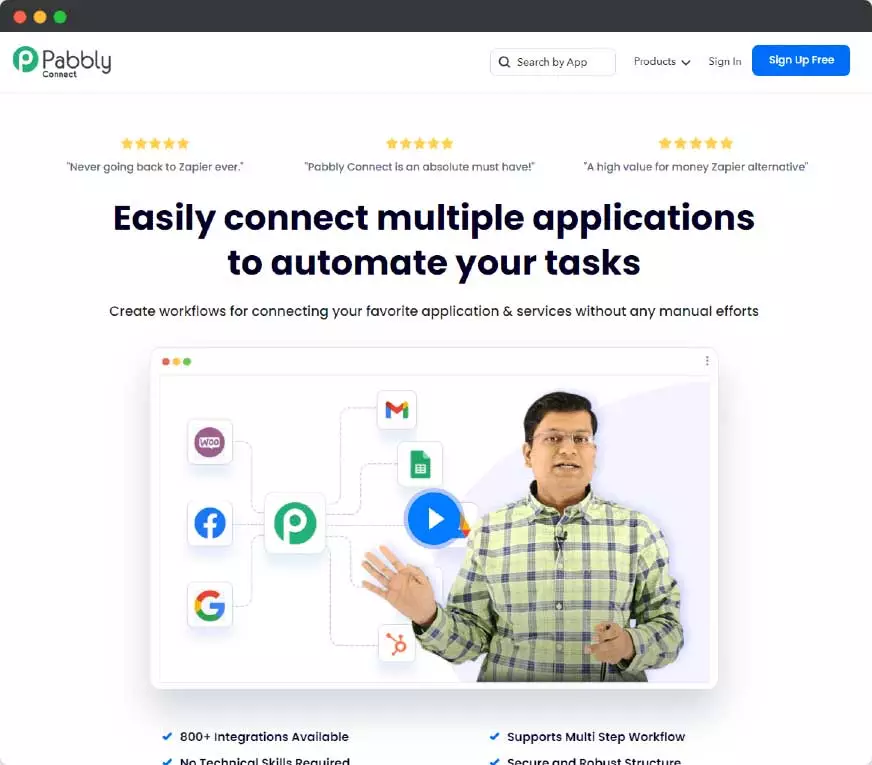
Pabbly Connect is a cloud-based automation platform that connects different apps and moves data between them automatically. You can use it to build workflows such as form submission to Google Sheets, WooCommerce order to CRM, Facebook lead to email sequence, webinar registration to WhatsApp reminder, payment received to invoice record, and many more automations without writing code.
In simple words, Pabbly Connect helps you replace repetitive manual work with automated workflows. A workflow usually starts with a trigger, such as a new form submission, new order, new lead, or new row in a spreadsheet. After that, Pabbly Connect performs one or more actions, such as sending data to another app, formatting text, filtering leads, sending messages, creating records, or running AI-powered steps.
The platform is most useful when your business already uses multiple tools and you need those tools to talk to each other. For example, if you use WordPress, WooCommerce, Google Sheets, Gmail, WhatsApp API, payment gateways, CRM tools, webinar tools, and email marketing software, Pabbly Connect can work as the bridge between them.
Current Pabbly Connect Lifetime Deal Pricing
As verified on June 23, 2026, Pabbly Connect’s official one-time payment page shows three lifetime plans. These plans are designed for different usage levels, so the right plan depends mainly on how many action tasks your workflows will consume every month.
| Plan | Tasks Per Month | One-Time Price | INR Price | Best For | My Recommendation |
|---|---|---|---|---|---|
| Standard Lifetime | 3,000 tasks/month | $349 | ₹32,799 | Solopreneurs, bloggers, light automation users | Good only if your workflows are simple and low-volume |
| Ultimate Lifetime | 10,000 tasks/month | $799 | ₹74,999 | Growing teams, ecommerce stores, coaches, consultants | Best balance for most serious buyers |
| Ultimate Plus Lifetime | 20,000 tasks/month | $1,298 | ₹1,21,999 | Agencies, automation consultants, multi-brand users | Best if you plan to build client or high-volume workflows |
Pabbly also shows a coupon code 5%OFF on its lifetime deal page. Since coupon availability can change, check the official checkout page before purchasing.
Important Lifetime Deal Warning
This is the part most affiliate reviews ignore, but it is extremely important.
Pabbly says one-time payment plans cannot be upgraded to another one-time payment plan later. It also says stacking or buying multiple lifetime plans is not allowed. This means you should not buy only based on today’s requirement. You should buy based on the automation volume you expect in the next 12 to 24 months.
For example, 3,000 tasks/month can look enough when you are only using two or three workflows. But once you start automating leads, sales follow-ups, ecommerce orders, abandoned cart notifications, WhatsApp reminders, CRM updates, and AI steps, your task usage can grow quickly. That is why I recommend the Ultimate Lifetime Plan for most serious users.
Which Pabbly Connect Plan Should You Buy?
Here is my practical recommendation based on real business use cases.
| User Type | Recommended Plan | Reason |
|---|---|---|
| Blogger or creator | Standard Lifetime | Enough for basic form, email, sheet, and content workflows |
| Coach or consultant | Standard or Ultimate | Choose Ultimate if you use lead follow-ups, webinars, WhatsApp, CRM, or email sequences |
| Ecommerce seller | Ultimate Lifetime | Orders, abandoned carts, inventory, customer records, and marketing automations can consume tasks quickly |
| Agency owner | Ultimate Plus Lifetime | Client workflows and repeated automations need more monthly task capacity |
| Automation freelancer | Ultimate Plus Lifetime | Better for testing, client demos, templates, and repeatable workflow delivery |
| Beginner testing only | Free plan first | Test the interface before buying if you are unsure about your automation needs |
My personal buying logic: If you are only experimenting, start free. If you are running a real online business, avoid underbuying. If you work with clients or plan to use Pabbly Connect as part of your service delivery, choose Ultimate Plus because task limits become a business constraint very quickly.
How Pabbly Connect Counts Tasks
This is one of the biggest reasons people compare Pabbly Connect with Zapier and Make. In Pabbly Connect, a task is generally an action performed inside your workflow. Triggers are not counted as tasks. Pabbly’s internal steps such as filters, routers, and formatters are also not counted as tasks.
This matters because most useful automations need more than one step. For example, a lead workflow may collect the lead, clean the phone number, check the lead source, filter unqualified leads, add qualified leads to CRM, send an email, and send a WhatsApp message. If internal steps are free, the workflow becomes more affordable to run.
But external action steps still matter. If your workflow sends data to many different apps, each external action can consume monthly task usage. Before buying, estimate how many leads, orders, forms, bookings, or messages you expect every month.
Pabbly Connect Features
Pabbly Connect has changed a lot from its early days. The current platform is not just a simple app connector. It now includes workflow automation features, internal tools, AI-related modules, routers, filters, code steps, and automation control options that make it useful for both beginners and advanced users.
2,000+ App Integrations
Pabbly Connect currently promotes 2,000+ app integrations. This includes popular business tools across forms, CRMs, ecommerce platforms, email marketing software, payment gateways, spreadsheets, webinar tools, social platforms, and productivity apps.
For most small business automations, the integration library is enough. But before buying, you should still search for your most important apps inside Pabbly Connect. If one critical app is missing and there is no webhook or API workaround, that can become a problem.
Multi-Step Workflow Builder
Pabbly Connect allows you to create multi-step workflows where one trigger can lead to multiple actions. This is useful for lead handling, order management, email automation, customer onboarding, team notifications, and reporting.
Example: when a new WooCommerce order arrives, you can add the order to Google Sheets, notify the team, update CRM, send the customer an email, send a WhatsApp message, and create a task for dispatch.
Filters, Routers, And Formatters
Filters, routers, and formatters make automations smarter. You can clean phone numbers, format dates, split workflows based on conditions, route leads based on location, separate hot and cold prospects, and prepare data before sending it to another app.
This is extremely useful for Indian businesses where phone number formats, city names, language preferences, payment status, and enquiry types are often inconsistent.
Email Parser
Email Parser helps you extract useful data from incoming emails and use that data in workflows. This can be useful for order emails, lead emails, payment notifications, appointment emails, vendor emails, and inquiry emails where structured data needs to be extracted automatically.
JavaScript And Python Module
Pabbly Connect also includes JavaScript and Python modules. This is useful when normal no-code steps are not enough and you need custom logic, calculations, formatting, parsing, or API preparation inside the workflow.
This feature has become more valuable now because AI tools can help users generate small code snippets for specific workflow logic. Still, you should test all code carefully before using it in live business workflows.
AI Assistant And MCP Servers
The current lifetime plan feature list includes AI Assistant and MCP Servers. This makes Pabbly Connect more relevant for users building AI-assisted workflows, automated data processing, content workflows, internal productivity systems, and agent-style automations.
If you are planning to use automation with AI tools, this is a strong reason to consider Pabbly Connect instead of treating it only as a basic Zapier alternative.
Human In The Loop
Human in the Loop is useful when you do not want every automation to run blindly. Some workflows need human approval before the next step. For example, approving a refund, reviewing a lead before assigning it to sales, checking a generated message before sending it, or manually approving a customer communication.
Security And Compliance
Pabbly currently highlights ISO 27001:2022 certification and SOC 2 Type 2 compliance on its official page. It also mentions encryption in transit and at rest. This is important if you plan to connect business-critical tools, payment notifications, CRM data, or customer records.
That said, no automation platform should be used carelessly. You should connect only necessary apps, review permissions, protect API keys, and avoid sending highly sensitive data unless you have checked your own compliance requirements.
Best Pabbly Connect Use Cases
Pabbly Connect is strongest when it saves time, reduces missed follow-ups, and keeps business data organized. Here are practical use cases where it can give fast ROI.
Lead Management Automation
You can capture leads from forms, Facebook lead ads, landing pages, Google Sheets, chatbots, or website enquiries and send them to CRM, email marketing software, Google Sheets, WhatsApp, or your sales team automatically.
This is useful because many businesses lose leads not because they lack traffic, but because they do not follow up fast enough.
Ecommerce Automation
Ecommerce sellers can automate order records, customer updates, product workflows, abandoned cart notifications, delivery coordination, review requests, and customer segmentation. This is where the Ultimate plan usually makes more sense than the Standard plan because order and customer workflows can consume tasks quickly.
WhatsApp And Email Follow-Up
Pabbly Connect can work with other tools to trigger WhatsApp or email follow-ups based on form submissions, orders, webinar registrations, payment status, or lead stage. This is one of the most valuable use cases for coaches, consultants, service providers, and local businesses.
Agency Client Delivery
Agencies and automation freelancers can use Pabbly Connect to create repeatable workflow templates for clients. For example, lead capture to CRM, enquiry to WhatsApp, order to Google Sheets, webinar registration to reminder system, and client reporting automation.
If you sell automation setup services, the lifetime deal can become a business asset because it reduces your own tool cost while helping you deliver faster.
Pabbly Connect Pros And Cons
Pros
- One-time lifetime deal can reduce long-term automation software cost.
- Internal tasks such as filters, routers, and formatters are not counted as paid tasks.
- 2,000+ integrations cover most common small business use cases.
- Good for creators, coaches, consultants, ecommerce stores, and agencies.
- Includes useful automation tools such as email parser, delay, scheduling, iterator, filter, router, formatter, JavaScript, and Python module.
- AI Assistant and MCP Server support make it more relevant for modern AI workflows.
- 30-day refund policy gives buyers time to test.
- Unlimited team members are included in the current lifetime plans.
Cons
- One-time plans cannot be upgraded later, so underbuying can become expensive.
- Stacking multiple lifetime plans is not allowed.
- Task limits are fixed every month in lifetime plans.
- Some niche app integrations may still require webhook or API workarounds.
- Advanced automations still require planning, testing, and debugging.
- Unused tasks do not become a strong advantage if your usage is highly seasonal.
- Not the best choice if you need enterprise-level governance like some larger automation platforms.
The biggest pro is cost control. The biggest con is the no-upgrade restriction for one-time plans. That is why the best buying decision is not about the cheapest plan. It is about choosing the plan that will not restrict your workflows later.
Pabbly Connect Vs Zapier Vs Make
Pabbly Connect is not the only automation tool. Zapier and Make are also strong platforms. The right choice depends on your budget, app requirements, technical comfort, and automation complexity.
| Tool | Strongest Advantage | Best For | Main Limitation |
|---|---|---|---|
| Pabbly Connect | Lifetime deal and free internal tasks | Budget-conscious businesses, creators, ecommerce sellers, agencies, and automation freelancers | Lifetime plans cannot be upgraded later |
| Zapier | Huge app ecosystem and mature automation platform | Teams that need wide app coverage, enterprise features, and polished reliability | Monthly cost can increase as task usage grows |
| Make | Visual scenario builder and flexible workflow design | Users who like visual automation mapping and complex workflow logic | Credit usage can grow quickly in complex scenarios |
My practical view: Choose Zapier if your business depends on a very specific app integration that only Zapier supports. Choose Make if you prefer visual scenario building and complex branching logic. Choose Pabbly Connect if you want strong automation capability with a one-time cost advantage.
Who Should Use Pabbly Connect?
Pabbly Connect is a strong fit for:
- Creators who want to automate lead magnets, email lists, content workflows, and customer onboarding.
- Coaches and consultants who want to automate leads, webinar reminders, payments, and follow-ups.
- Ecommerce sellers who want to automate orders, sheets, CRM, customer communication, and review requests.
- Agencies that want to deliver automation workflows for clients without expensive monthly software dependency.
- Small businesses that use multiple apps but do not have an internal tech team.
- Freelancers and virtual assistants who want to offer automation setup as a paid service.
- Marketers who want to connect forms, ads, sheets, email tools, CRM, WhatsApp, and reporting systems.
Who Should Not Buy Pabbly Connect?
You should not buy Pabbly Connect just because a lifetime deal is available. Avoid buying immediately if:
- You have not checked whether your must-have apps are available inside Pabbly Connect.
- You cannot estimate your monthly task usage at all.
- You need enterprise automation governance, advanced compliance workflows, or very complex permission structures.
- Your workflows depend on highly niche tools with no API, no webhook, and no Pabbly integration.
- You only need one simple automation and a free plan is enough for now.
This honest filtering is important. The best buyer is not someone who buys because of discount urgency. The best buyer is someone who knows the workflows they want to automate and can benefit from long-term cost savings.
Pabbly Connect Lifetime Deal
The lifetime deal is the main reason Pabbly Connect gets serious attention from small businesses and automation users. Instead of paying monthly for automation software, you can pay once and use the selected plan with the included monthly task limit.
The lifetime deal is best if you have predictable recurring workflows. For example, lead capture, order processing, CRM updates, spreadsheet records, customer follow-ups, and team notifications are usually repeated every month. If you automate these using a monthly tool, the cost continues. With a lifetime plan, your automation software cost becomes easier to control.
But remember the most important limitation again: one-time plans cannot be upgraded later. So do not choose the smallest plan only to save money today if you know your automation usage will increase.
Pabbly Connect Refund Policy
Pabbly currently promotes a 30-day money-back guarantee for the lifetime deal. That gives you time to test workflows, check app integrations, understand task usage, and decide whether the plan is right for you.
My recommendation is to test the exact workflows you plan to use inside the first few days after purchase. Do not just buy and leave the account unused. Create real workflows, run sample data, check task usage, and decide whether the selected plan is enough before the refund window closes.
My Final Verdict On Pabbly Connect
Pabbly Connect is a strong automation platform for users who want to reduce manual work and avoid ongoing monthly automation costs. The lifetime deal is attractive, but it should be treated as a business tool purchase, not an impulse deal purchase.
If you are a creator, coach, consultant, ecommerce seller, agency, or freelancer who already uses multiple online tools, Pabbly Connect can save a lot of time and money. If you plan carefully and choose the right lifetime plan, it can become one of the most valuable tools in your business stack.
My recommendation: Start with the free account if you are unsure. Buy Standard only if your automation needs are small. Choose Ultimate if you run a serious business. Choose Ultimate Plus if you are an agency, automation service provider, or high-volume user.
Frequently Asked Questions On Pabbly Connect
Is Pabbly Connect worth it in 2026?
Yes, Pabbly Connect can be worth it in 2026 if you want to automate repetitive business workflows and reduce monthly automation software costs. It is especially useful for creators, coaches, ecommerce sellers, consultants, agencies, and small businesses.
Is the Pabbly Connect lifetime deal still available?
As verified on June 23, 2026, Pabbly Connect lifetime plans are available on the official one-time payment page. Since software offers can change, always check the current checkout page before buying.
What is the current Pabbly Connect lifetime deal price?
The current lifetime pricing starts at $349 one-time for the Standard Lifetime plan with 3,000 tasks per month. The Ultimate Lifetime plan is $799 for 10,000 tasks per month, and the Ultimate Plus Lifetime plan is $1,298 for 20,000 tasks per month.
Which Pabbly Connect lifetime plan should I buy?
For light usage, Standard can work. For most serious businesses, the Ultimate Lifetime plan is the safer choice because it gives 10,000 tasks per month. Agencies and automation freelancers should consider Ultimate Plus because client workflows can use more tasks.
Can I upgrade my Pabbly Connect one-time plan later?
No. Pabbly says one-time payment plans cannot be upgraded to another one-time payment plan later. This is why you should choose the plan based on future usage, not only your current requirement.
Can I stack multiple Pabbly Connect lifetime plans?
No. Pabbly says stacking or purchasing multiple lifetime plans is not allowed. If you expect higher usage, choose the right lifetime plan from the beginning.
What counts as a task in Pabbly Connect?
A task is generally an action performed inside a workflow. Triggers are not counted as tasks. Internal steps such as filters, routers, and formatters are also not counted as tasks.
What happens if I reach my monthly task limit?
If you reach the monthly task limit of your one-time plan, your included monthly tasks remain fixed. You may need a recurring plan if you require more tasks beyond your lifetime plan limit.
Is Pabbly Connect better than Zapier?
Pabbly Connect is better if your priority is lifetime pricing and lower long-term cost. Zapier is better if you need the largest app ecosystem, enterprise features, or a specific integration that Pabbly does not support.
Is Pabbly Connect better than Make?
Pabbly Connect is better for users who want a one-time pricing option. Make is better for users who prefer a highly visual scenario builder and complex visual automation logic.
Is Pabbly Connect good for agencies?
Yes, Pabbly Connect can be useful for agencies and automation freelancers because it helps create repeatable client workflows. Agencies should usually consider Ultimate Plus because client work can consume more tasks.
Does Pabbly Connect offer a refund?
Pabbly currently promotes a 30-day money-back guarantee. You should test your important workflows during the refund window to make sure the plan is right for your business.
Can I try Pabbly Connect for free before buying?
Yes, you can try Pabbly Connect for free before buying. This is useful if you want to check the interface, integrations, and workflow builder before choosing a lifetime plan.