

Choosing the best WordPress AI agent in 2026 is no longer just about writing blog posts faster. A real AI agent should help your WordPress site think, decide and take action. That means it should work with your content, forms, WooCommerce data, emails, APIs, CRMs, webhooks and business workflows.
If you only need a few AI-written paragraphs, a normal AI writing plugin may be enough. But if you want your WordPress website to behave like a smarter business system, you need an AI agent or AI workflow automation plugin that can actually execute tasks.
My top recommendation for most WordPress users is FlowMattic AI Agent because it is built around workflows, tool calling, memory and integrations. Bit Flows is a strong alternative if you prefer a drag-and-drop automation canvas. AI Engine is useful if your priority is chatbots, AI forms, content generation and editor assistance. WordPress.com AI is useful for WordPress.com users who want AI directly inside their editing and site-management workflow.

Disclosure: Some links on this page may be affiliate links. If you buy through them, I may earn a commission at no extra cost to you. The recommendations below are based on practical WordPress automation use cases, not only feature lists.
Quick Answer: Best WordPress AI Agent in 2026
| Use Case | Best Choice | Why It Fits |
|---|---|---|
| Best overall WordPress AI agent | FlowMattic AI Agent | Best for AI workflows, tool calling, app integrations, memory and multi-step automation. |
| Best visual workflow alternative | Bit Flows | Good for drag-and-drop automation, triggers, actions, APIs, webhooks, conditions and AI workflows. |
| Best AI toolkit for chatbots and content | AI Engine | Useful for chatbots, AI forms, content generation, embeddings, image generation and editor assistance. |
| Best for WordPress.com users | WordPress.com AI | Useful for in-editor AI help, site workflow support and MCP-based external AI agent connections. |
| Best for WooCommerce automation | FlowMattic or Bit Flows | Better when the goal is to automate order follow-ups, product content, CRM updates, support and reporting. |
Bottom line: If your goal is real business automation inside WordPress, start with FlowMattic AI Agent. If your goal is only content writing or chatbot setup, AI Engine may be enough. If your goal is visual no-code automation, compare FlowMattic with Bit Flows before buying.
What Is a WordPress AI Agent?
A WordPress AI agent is a plugin, workflow or connected AI system that can understand instructions, use tools, process data and complete tasks inside or around a WordPress website.
This is different from a basic AI writer. A normal AI writing plugin may generate a blog post or product description. An AI chatbot may answer visitor questions. But a true AI agent can combine AI with actions. It can receive a form submission, classify the lead, update a CRM, create a task, send an email, prepare a reply, create a WordPress post and notify your team.
That is why the word agent matters. The best WordPress AI agent should not only produce text. It should help your website execute a workflow.
AI Agent vs AI Plugin vs AI Chatbot
| Type | What It Does | Best For |
|---|---|---|
| AI writing plugin | Generates text, titles, meta descriptions, blog drafts and product descriptions. | Content creators and bloggers. |
| AI chatbot | Talks to visitors and answers questions using prompts or knowledge base content. | Customer support and lead capture. |
| AI workflow automation plugin | Connects WordPress with apps, triggers, APIs, webhooks and multi-step workflows. | Agencies, consultants and business websites. |
| WordPress AI agent | Uses AI reasoning plus tools to make decisions and take actions. | Automation, lead qualification, WooCommerce, support and operations. |
Important: Many plugins call themselves AI tools, but only a few are useful as real agents. When evaluating a tool, ask: Can it take action, or does it only generate text?
How I Evaluated These WordPress AI Agents
I evaluated these tools from the perspective of a WordPress automation builder, not only from the perspective of a blogger. A ranking article that only says “this plugin writes content” is not enough in 2026. WordPress users now need tools that can handle automation, context, integrations, data and execution.
- Action ability: Can the AI take action or only generate text?
- WordPress depth: Can it work with posts, pages, forms, users, comments, WooCommerce or custom post types?
- Workflow strength: Can it support triggers, conditions, approvals, webhooks, APIs and multi-step automation?
- AI flexibility: Can it work with multiple AI providers like OpenAI, Claude, Gemini or other models?
- Business usefulness: Can it help with leads, support, content operations, e-commerce, reporting or customer follow-up?
- Beginner practicality: Can a non-developer start with it without custom coding?
1. FlowMattic AI Agent — Best Overall WordPress AI Agent
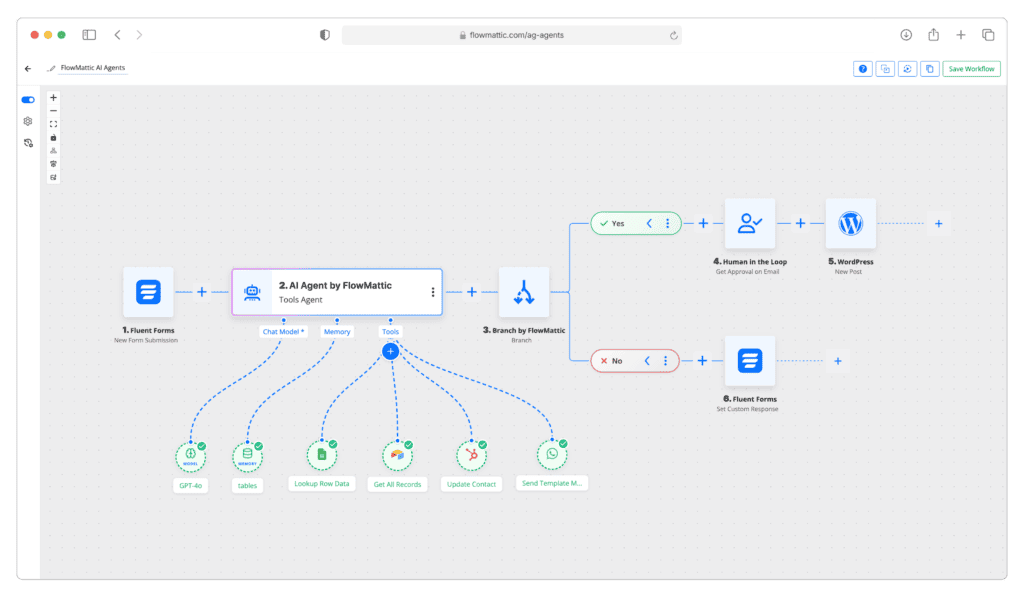
FlowMattic AI Agent is the best overall choice if you want WordPress to become a real automation hub. It is not just useful for generating content. Its biggest strength is that it allows AI to work with tools, integrations, memory and workflows.
FlowMattic’s official AI Agent page says it can connect 10 AI providers, use 1,000+ actions from 424+ integrations, support tool calling and reason through multi-step tasks inside WordPress.
- Generate a blog post, create the draft and notify an editor.
- Read a contact form submission, classify the lead and send it to a CRM.
- Qualify a prospect and send a personalized follow-up email.
- Create WooCommerce product descriptions from structured product data.
- Analyze support queries and route them to the right team.
- Run scheduled reporting workflows and send summaries to your team.
| FlowMattic Strength | Why It Matters |
|---|---|
| Tool calling | The AI can execute real actions instead of only replying with text. |
| Multiple AI providers | You are not locked into only one AI model. |
| Workflow automation | You can connect AI with forms, APIs, emails, CRMs, content and business processes. |
| Memory options | Agents can preserve context for better conversations and workflows. |
| WordPress native setup | The automation runs inside your WordPress environment. |
Choose FlowMattic if: you want to build WordPress AI agents that can actually perform business tasks, automate repetitive work, connect with external apps and support content, lead generation, WooCommerce or customer support workflows.
2. Bit Flows — Best Visual AI Workflow Alternative
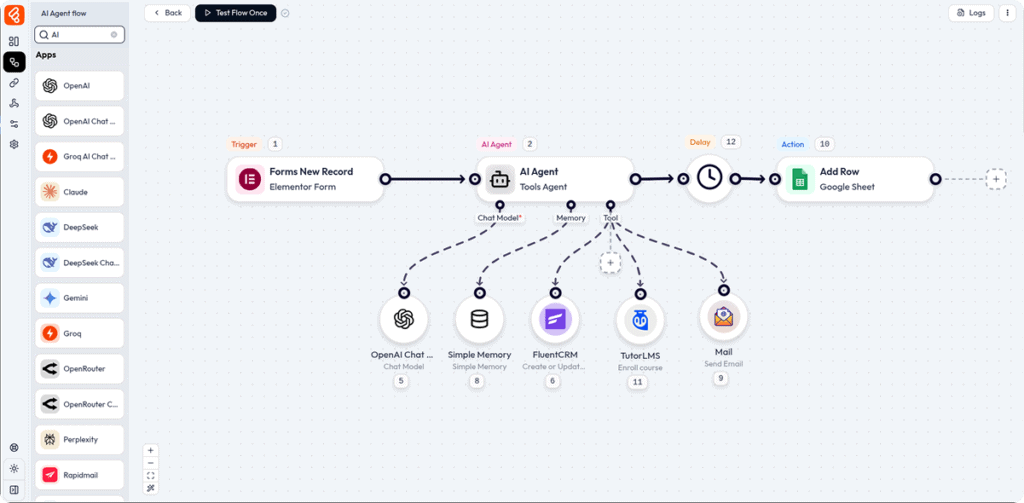
Bit Flows is a strong alternative for WordPress users who want a visual, no-code automation builder. Its official site describes it as a WordPress automation plugin with AI Agent + MCP Client, drag-and-drop workflow building, webhooks, APIs, conditional logic and automation across 346+ platforms.
Choose Bit Flows if: you want a visual automation builder inside WordPress and your priority is building structured workflows with triggers, conditions, actions, webhooks and AI steps.
3. AI Engine — Best AI Toolkit for Chatbots, Content and Editor Assistance
AI Engine is a strong choice if you want a broad AI toolkit inside WordPress. Its official page describes features such as chatbots, forms, Copilot, content generation, embeddings, image creation, MCP for AI agents and support for multiple AI providers.
- AI chatbots: useful for answering visitor questions and improving support.
- Content generation: helpful for drafts, rewrites, translations and content ideas.
- AI forms: useful when forms need AI-generated answers or conditional behavior.
- Embeddings and knowledge: helpful for semantic search and knowledge base use cases.
- Editor assistance: useful for working with content inside the WordPress editor.
Choose AI Engine if: your main need is chatbots, content generation, AI forms, editor help and knowledge-base style AI inside WordPress.
4. WordPress.com AI — Best Native AI Option for WordPress.com Users
WordPress.com AI is different from plugins like FlowMattic, Bit Flows and AI Engine. It is not mainly a self-hosted WordPress.org plugin. It is more relevant for users running their sites on WordPress.com.
WordPress.com’s AI page explains that its AI assistant can help inside the editor, and its MCP feature can allow connected AI agents like Claude or ChatGPT to read, write and manage WordPress.com site content, comments, media and more through natural conversation.
Choose WordPress.com AI if: your site is hosted on WordPress.com and you want native AI assistance inside that ecosystem. If you run a self-hosted WordPress.org site and need automation, compare FlowMattic, Bit Flows and AI Engine instead.
Best WordPress AI Agent by Use Case
| Your Goal | Best Tool | Reason |
|---|---|---|
| Automate leads and follow-ups | FlowMattic | Strong for tool calling, app integrations, forms, email and CRM workflows. |
| Build visual no-code workflows | Bit Flows | Good drag-and-drop automation canvas with triggers, actions and AI steps. |
| Add an AI chatbot | AI Engine or FlowMattic | AI Engine is strong for chatbot features; FlowMattic is better if chatbot logic must trigger business workflows. |
| Generate WordPress content | AI Engine or FlowMattic | AI Engine is good for direct content generation; FlowMattic is better for automated publishing workflows. |
| Automate WooCommerce operations | FlowMattic or Bit Flows | Useful for product descriptions, order updates, follow-ups, notifications and CRM actions. |
| Use AI inside WordPress.com | WordPress.com AI | Best fit for WordPress.com users who want native editor AI and MCP support. |
Best WordPress AI Agent for WooCommerce
WooCommerce stores need more than content generation. They need speed, personalization and follow-up. An AI agent can help with product data, customer communication, support, reporting and sales recovery.
- Product description generation: create better descriptions from SKU, category, material, features and customer intent.
- Abandoned cart follow-up: classify cart value and send personalized recovery messages.
- Order support: help customers with order status, shipping updates and common questions.
- Review requests: trigger review messages after successful delivery.
- Internal reports: summarize orders, refunds, low-stock products and customer issues.
My recommendation: Use FlowMattic if you want deeper AI-led logic and integrations. Use Bit Flows if you prefer visually building e-commerce workflows step by step.
Best WordPress AI Agent for Content Operations
Most people think AI content means “write a blog post.” That is too limited. The real opportunity is content operations.
- Collect keyword or topic ideas.
- Create a brief with target audience, search intent and outline.
- Generate the first draft.
- Add title, meta description and internal-link suggestions.
- Create a WordPress draft.
- Notify a human editor for review.
- Publish only after approval.
- Repurpose the article into email, LinkedIn, X and short-form content.
This is where FlowMattic becomes powerful because it can connect content generation with workflow execution. AI Engine is useful for drafting and editor assistance, but FlowMattic is stronger when content must move through a full business process.
Best WordPress AI Agent for Lead Generation
Lead generation is one of the strongest use cases for WordPress AI agents. A normal form only collects data. A smart AI workflow can analyze that data and trigger the right next step.
- Check whether the lead is high-intent or low-intent.
- Classify the inquiry by service category.
- Assign a priority score.
- Send a personalized email reply.
- Create a CRM contact.
- Notify the right team member.
- Trigger a follow-up sequence if there is no reply.
This is the difference between a website that only receives leads and a website that actively works on leads. For this use case, FlowMattic is the strongest recommendation.
Common Mistakes When Choosing a WordPress AI Agent
- Mistake 1: Choosing an AI writer when you actually need workflow automation.
- Mistake 2: Installing a chatbot without connecting it to real business actions.
- Mistake 3: Buying the most feature-heavy plugin without knowing your use case.
- Mistake 4: Ignoring AI API costs and token usage.
- Mistake 5: Letting AI publish content without human review.
- Mistake 6: Not testing edge cases before using automation on live leads or customers.
The safest approach: start with one workflow, test it deeply, add human approval where needed and expand only after it works reliably.
My Final Recommendation
If I had to choose one WordPress AI agent for most serious business use cases in 2026, I would choose FlowMattic AI Agent.
The reason is simple: FlowMattic is built for action. It can connect AI with real workflows, tools, integrations, memory and structured outputs. That makes it more useful for businesses than a plugin that only writes content or answers basic chatbot questions.
- Choose FlowMattic for AI automation, workflows, leads, WooCommerce, APIs and business operations.
- Choose Bit Flows for visual no-code automation and drag-and-drop workflow building.
- Choose AI Engine for chatbots, AI forms, editor assistance and content generation.
- Choose WordPress.com AI if your website is on WordPress.com and you want native AI assistance.
Do not buy an AI plugin just because it has “AI” in the name. Buy the tool that matches the workflow you actually want to improve.
Start With FlowMattic AI Agent →
Frequently Asked Questions
What is the best WordPress AI agent in 2026?
For most WordPress users, FlowMattic AI Agent is the best overall choice in 2026 if the goal is real automation. It can connect AI models with WordPress workflows, tools, forms, CRMs, email, APIs, WooCommerce and other business processes.
What is a WordPress AI agent?
A WordPress AI agent is a plugin or workflow system that uses artificial intelligence to understand a goal, use tools, process data and complete tasks inside or around a WordPress website.
How is an AI agent different from an AI chatbot?
An AI chatbot mainly talks to visitors and answers questions. An AI agent can go further by taking actions, updating records, sending messages, creating drafts and triggering workflows.
Which WordPress AI plugin is best for automation?
FlowMattic and Bit Flows are the strongest choices for automation. FlowMattic is better when you want AI agents with tool calling, memory, structured output and app integrations.
Can WordPress AI agents help WooCommerce stores?
Yes. A WordPress AI agent can help WooCommerce stores automate product descriptions, abandoned cart follow-ups, order notifications, review requests, customer support replies, stock alerts and internal reporting.
Are WordPress AI agents worth the cost?
WordPress AI agents are worth the cost when they save time, reduce manual work, improve response speed, increase lead conversion or make business operations smoother. The real value comes from automation and execution, not just AI-generated text.